
You’ll notice after a few days of removing your names from data broker websites that the search engines begin to find older links to your names and profiles. They don’t like to come up empty handed. Their first results will show their paying customers’ results (sponsored), then the easiest to find information in their webcrawls. Once those begin to disappear, the search engines will display older, more obscure, and cached results. This link explains Google’s cached pages policy.
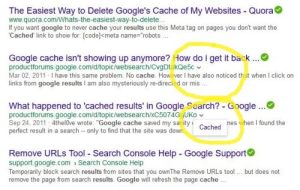
In the screenshot above, the first result is a current result and the next two are cached, indicated by the down arrow at the end of the URL. In the second circled example, I clicked on the arrow and the word ‘cached’ appeared. In a Google search, if you click on the word ‘Cached’, it takes you to a page with information about when the page was last crawled, or the last snapshot was taken. If you click on the ‘current page’ link, you can compare the cached page to what is online now. If they are different, click on ‘Learn more’. Read this page, make sure you are signed in to your Google account, and click on the ‘remove old or deleted information’ link. Read the page and in Step 2, click the ‘Get information off Google search results’ link, then the ‘I don’t control the web page’, and FINALLY the ‘Remove outdated content tool’. This tool will remove the cached pages as long as the content on the page has changed or the page is gone. I learned to use it by trial and error. Go all the way back to the tab with the cached search result you opened by clicking ‘Cached’. Right click the link at the top, copy it, and then pasted it into the Remove Content tool. Answer the questions about whether the entire page is gone or the content has changed. When it asks for a word that was in the cached page but not in the current one, you can usually put your last name or another key word of your profile. You’ll start a list of pending removals, removals, and denials. If a request is denied, try again and answer the questions differently. It can’t hurt.
I described the Google one first, because the Bing method is almost identical. You have to log in to an Outlook account, then click on the word ‘Cached’ in the search results (next to the little down arrow). The difference is that on the comparison page that opens, there is no link to the Removal Tool for Bing. The link is here. Follow the same basic procedure by pasting the cached URL into the tool, indicate whether the page is gone or the content has changed, and submit the request.
For Yahoo search results, there is no removal tool. They said they crawl the web when they are good and ready and too bad if their results are old. Let’s face it, they’re barely hanging on and that’s only part of the reason.
Good luck! Contact me if you have questions. I learned by making mistakes and trying over and over.
© 2019 GR All Rights Reserved
 Now Hide Me
Please leave a comment